

Valerie Neff Newitt
February 2023—Workspace design seldom supports the tasks workers perform, and pain and productivity loss can be the outcomes. Eliminating the risks at the design stage is therefore the best approach. When that’s not possible, retrofitting to reduce or eliminate some (but not all) of the hazards is an option, though it’s difficult and can be costly, says Marissa Pentico, MS, OT/L, CPE, ergonomics coordinator in the Duke University Occupational and Environmental Safety Office.
Take laboratory bench heights, for example. The general principle is to design workspaces for 90 percent of the population, Pentico says, then make adjustments for the extremely short and tall. But for the lab workbench, “the easiest and best solution is to make the surface powered-height adjustable,” to accommodate not only workers of varying heights but also their various tasks.
One of Duke’s laboratories followed up on that suggestion. To cut costs, they asked the bench representative if it was possible to safely attach a standard office desk adjustable base to the bench. “It did work, and for less than $1,000 we were able to outfit a bench for powered adjustability,” Pentico says, adding that consulting with the bench and height-adjustable base representatives is key to ensuring stability and strength.
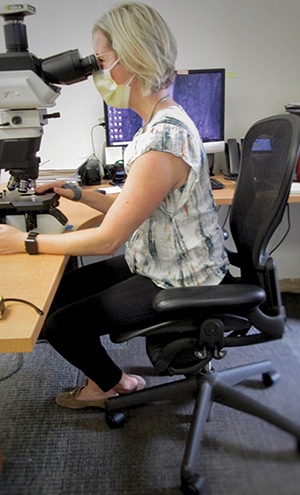
Many manually height-adjustable lab benches are available, she says, but they’re limited in terms of how high or low they can go. Standard heights are 36 to 37 inches, and she is aware of only one or two companies that offer more height options. “We need to start considering the heights people are working at and what they’re doing,” Pentico says. For a majority of the population, “over 40 inches is what we would recommend as a bench height for standing work tasks, and 29 to 30 inches for seated tasks—even lower for sole computer use.”
For standing work, as a general rule, bench height should be above elbow height for precision work (39–43 inches), just below elbow height for light work (34–37 inches), and four to six inches below elbow height for heavy work (28–35 inches).
There are benches that are considered height adjustable—they’re adjusted by pins—but the bench vendor is often called in to make the adjustments, Pentico says. “It needs to be easier than that. When a shorter employee is replaced by a taller employee during shift changes, they need to be able to make that adjustment easily.” When powered-height adjustment isn’t available, the only option, she says, is to identify a height that would accommodate a majority of the workers. “That’s really difficult, especially when you tie it in with microscope use, for example.”
Microscope and computer use require two separate heights. The keyboard and mouse have to be positioned lower—“at elbow height,” Pentico says. The microscope has to be higher. “We typically would recommend two different heights and positioning both so that the worker is able to pivot the chair from one to the other if the worker is sitting at an L-shaped workstation and is frequently alternating between both tasks.”
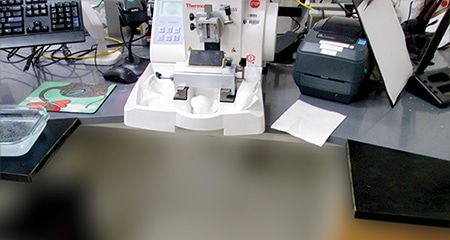
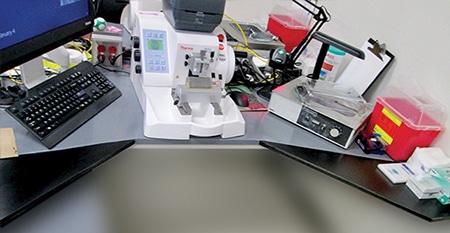
Eliminating or reducing twisting is important. A histotechnologist at a microtome with hot and cold baths placed on the sides would twist from in front of the microtome to reach the baths. A better workstation setup would keep the body aligned. In a case like this at Duke, “we worked with two designs,” Pentico says, where the bench vendor offered to retrofit two benches by adding pieces to their fronts. “We decided to place wings on either side of the lab worker. The goal was to have the water baths closer to the employee. One of the approaches was to change the angle of the wings to 90 degrees, the other to reduce it to a 45-degree angle, with the water baths placed on those wings.”
Some employees considered the first setup too enclosed, with too little ability to move, she says, and some chose the second option. Overall, the baths should be placed on the wings on either side, “so all they have to do is pivot their chair to access the bath and pivot their chair back to get to the microtome.” Also ensure there is clearance under the bench to enable the person to freely pivot.
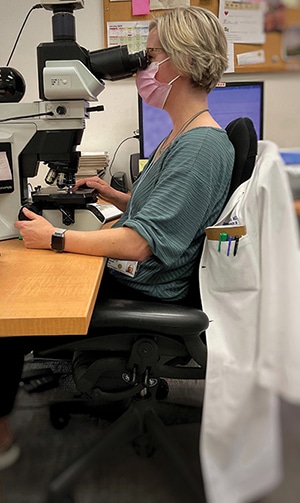
What the employee looks at and/or reaches for or holds determines body position. With the microscope, for example, the height of the eyepiece determines the neck position. If too low, the neck will be bent. “If your elbows move away from your side when you manipulate the knobs on the microscope, then you’re reaching. You want to sit closer so you’re not having to lean forward and your neck is in a better position when using the eyepiece.” However, sitting too close to the adjustment knobs is also uncomfortable, she adds. “So you want to get close but you can’t get too close, and that’s what makes it hard.”
The same company that provided the wings for the microtome benches also provided them with a full benchtop with a cutout, so that it’s angled similarly, at 45 degrees. The benchtop was then placed on a powered height-adjustable base. “You can also put a microscope in the front so that the user is able to get in closer to the microscope and still have arm support.”
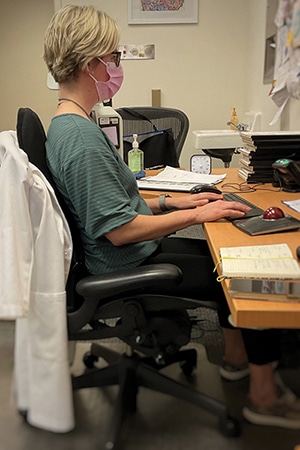
In addition to workspace modifications, Pentico advises work practice changes, one of which is to alternate between sitting and standing twice an hour. For a more specific recommendation, she cites Alan Hedge, PhD, professor emeritus of human-centered design at Cornell University, who advises sitting (for computer work) for 20 minutes, standing for eight, and moving for two minutes. She calls it the “20-8-2” rule.
If being in an awkward position for a prolonged period is unavoidable, her advice: Do your best to alternate between the awkward and neutral positions—that is, the position in which the least stress is applied to joints and tissues. The recommended position would be with the feet on the ground, hips and knees at about the same height, back straight, elbows at sides, and neck upright. “It is about the body working most efficiently,” Pentico says, adding, “This is not what we’re seeing a lot of.” For example, a bent neck forces muscles to work harder, but it’s hard to know who will develop pain from such positions. “Some individuals become accustomed to awkward positions and don’t develop pain or discomfort while others do.”
“Rotate the tasks, get up and move, do stretches,” she says. Alternating is good for eyes too: Every 20 minutes, look at something 20 feet away for 20 seconds.
Sarah Bean, MD, professor of pathology and vice chair for faculty, Duke University School of Medicine, says “it’s never too early to have someone photograph you at your workstation,” whether at the bench, microscope, computer, or elsewhere. Look at the angle of the spine, for example—“is it all in one plane?”
The microscope Dr. Bean uses now is superior ergonomically—lower stage, movable eyepiece—than microscopes of earlier years, she says. Still, even with this microscope, she was starting to have wrist, elbow, and shoulder pain. She assumed some of it was due to prolonged sitting and requested a sit-to-stand desk. Once it was in place, she called on Pentico to check her workstation, both the sitting and standing positions. “What do you see? What do I need to fix?” she asked.
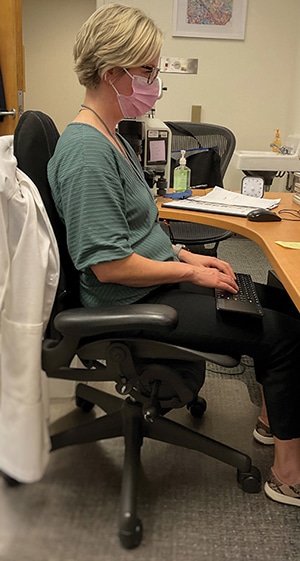
Pentico pointed to the adjacency of the computer and microscope, and Dr. Bean explained her need to move continually between the two. Pentico said the computer keyboard was too high and suggested a tray attached to the desk. It would be in the way, Dr. Bean said, and have to be pulled out and pushed in repeatedly. “I can’t do that,” she told Pentico.
“What she came up with is brilliant,” Dr. Bean says—a Bluetooth keyboard with a built-in trackpad for the mouse. “That addresses my wrist issues because I’m right-handed and my right wrist gets tired because I’m mousing a lot. Her solution gives me a second mouse option.” It also puts the keyboard in Dr. Bean’s lap. “So I can have the keyboard at the appropriate height without having to deal with the keyboard tray being in my way and having to pull it out and push it in.”
A second height-adjustable desk would have been the best option, Pentico says, but it wasn’t financially feasible at the time. The keyboard was a less ideal but affordable option that enabled Dr. Bean to alternate between microscope and computer use with less effort. It is typically lower than recommended, which is elbow height, Pentico says, “but it was at a more comfortable height than being on the desk.”
The microscope, on the other hand, wasn’t high enough, forcing Dr. Bean to look down. “It felt right because that is what my body was accustomed to. I’m trying to unlearn old habits but it’s not easy,” she says.
Dr. Bean was also standing for too long. “I’m always trying to get in more exercise, do more intervals, go longer, go farther. So I figured it was no big deal if I wanted to stand for an hour at a time. But Marissa said, ‘You’re going to hurt yourself.’ It seemed counterintuitive to me, but I followed her advice.” Dr. Bean now uses a timer to set what she calls “work intervals”—reminders to stretch, walk away from the computer, sit after standing. “And it’s an old-school analog timer so I don’t have to look at my computer and risk being distracted by email or the internet.”
For any employer, ergonomic setups and practices pay off, Pentico says, because healthier, more comfortable workers are known to be more productive workers. Dr. Bean, who is chair of the Department of Pathology’s well-being committee, agrees. Being comfortable physically in the workspace, she says, makes it possible to focus and to be efficient. “To do so without traumatizing your body and accumulating pain is exquisitely important,” she says, “and that is the intersection of ergonomics and well-being.”
Valerie Neff Newitt is a writer in Audubon, Pa.